

Description
Bulk Renamer for Google Drive™
Overview
Bulk Renamer for Google Drive™ is a streamlined desktop utility designed to simplify the process of renaming multiple files directly within Google Drive. It eliminates the need to download files locally, rename them using desktop tools, and re-upload them to the cloud. Instead, users can select a folder in their Google Drive, apply customizable rename rules, and execute changes directly from the browser. This tool is ideal for professionals, educators, and content managers who frequently organize large volumes of files across shared or personal Drive folders.
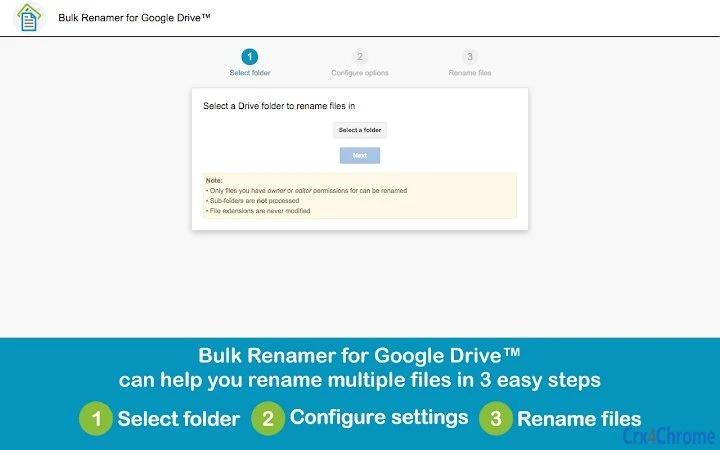
The software operates entirely within the browser environment, leveraging Google’s API to interact with Drive files. It supports only folders where the user holds owner or editor permissions, ensuring data integrity and access control. Sub-folders are not processed, and only files with appropriate permissions can be renamed. This makes the tool suitable for users managing collaborative projects or personal archives where file access must be strictly controlled.
Real-world usage includes renaming batches of documents, photos, or spreadsheets after import, standardizing naming conventions across departments, or preparing files for archival. The tool’s integration with Google Drive ensures seamless operation without requiring local file storage or sync conflicts.
Key Features & Capabilities
- Direct Cloud Renaming – Rename files in Google Drive without downloading or syncing. Changes are applied directly to the cloud, reducing workflow steps and minimizing error risk.
- Simple Replace Mode – Search for a specific text string in file names and replace it with a new string. Supports case-sensitive matching and replacement of all or only the first occurrence.
- Advanced Rename Options – Offers base name customization, numeric or timestamp prefixes and suffixes, and customizable separators for consistent file naming.
- Preview Before Execution – Displays a real-time preview of all renamed files before applying changes, allowing users to verify outcomes and avoid unintended modifications.
- Error Reporting – Provides a summary of any issues encountered during the renaming process, such as files with no matching text or insufficient permissions.
- Preserve File Metadata – Option to retain the original Last Modified date, ensuring file history remains accurate and compliant with versioning standards.
For example, a teacher can rename a folder of student submissions by replacing “_draft” with “_final” across all files in one action. A marketing team can prepend all campaign assets with a project code and timestamp to maintain traceability. The tool’s structured interface ensures even non-technical users can perform complex renaming tasks efficiently.
User Interface, Workflow & Performance
The user interface is clean and focused, built around a three-step workflow: select a folder, configure rename settings, and confirm execution. The Drive Picker integration allows users to navigate their Google Drive folders directly within the tool, ensuring a familiar experience. Navigation is intuitive, with clearly labeled options and immediate visual feedback during each step.
Workflow efficiency is high, as the tool eliminates redundant steps in file management. Users can complete a bulk rename operation in under a minute after selecting the target folder. The real-time preview feature enhances confidence in the outcome, reducing the risk of errors. After confirmation, the tool processes files sequentially, with status updates visible during execution.
The developer did not specify resource usage details. Performance observations are based on general software behavior patterns. The tool runs in the browser environment, so CPU and RAM usage are dependent on the system’s browser performance. Stability is expected to be consistent with standard web applications, particularly on modern systems with updated browsers. No known crashes or freezes were reported in the provided data.
Compatibility & System Requirements
Bulk Renamer for Google Drive™ is compatible with Windows and Mac operating systems. The application is delivered as a Chrome App, meaning it runs within the Google Chrome browser environment. It requires a stable internet connection to access Google Drive and perform file operations.
The installation size is 2.5 MB, which is minimal and suitable for quick deployment. The software version is 1.2.0, released on August 15, 2024. Exact system requirements were not listed. Compatibility information was partially provided, with support confirmed for Windows and Mac platforms. No specific hardware specifications were included.
Users should ensure their browser is up to date and that they have active access to their Google Drive account with appropriate permissions for the target folders.
Pros and Cons
Pros
- Eliminates the need to sync files locally for renaming
- Direct integration with Google Drive ensures real-time cloud updates
- Simple and advanced renaming modes cater to different user needs
- Real-time preview reduces risk of errors
- Free to use with no hidden costs
- Preserves original file modification dates when desired
Cons
- Only supports folders the user owns or edits
- Sub-folders are not processed, limiting scope
- Requires Google Chrome browser for operation
- No offline functionality available
- Dependent on internet connection for all operations
FAQ Section
Is Bulk Renamer for Google Drive™ free to use?
Yes, the software is completely free. There are no subscription fees or hidden charges associated with its use.
What operating systems does it support?
Bulk Renamer for Google Drive™ is compatible with Windows and Mac systems. It runs as a Chrome App within the Google Chrome browser.
Do I need to download files to rename them?
No. The tool operates directly in the cloud. Files are renamed in Google Drive without being downloaded to your local device.
Can I rename files in sub-folders?
No. The tool only processes the selected folder and does not include files in sub-folders.
Is my data secure when using this tool?
Yes. The tool uses Google’s official API and requires user authentication. It only accesses files for which the user has owner or editor permissions. No file data is stored on external servers.
Final Thoughts + CTA
Bulk Renamer for Google Drive™ delivers a focused, efficient solution for users who manage large numbers of files in Google Drive. Its ability to rename files directly in the cloud without local syncing is a significant advantage for productivity and workflow consistency. While it has limitations—such as no sub-folder support and browser dependency—it excels in its core purpose: fast, safe, and accurate bulk renaming.
Professionals, educators, and digital organizers who rely on Google Drive will find this tool indispensable for maintaining clean, standardized file structures. The intuitive interface, combined with powerful renaming features and a free license, makes it a standout utility in the productivity space.
Download Bulk Renamer for Google Drive™ now
Guides & Tutorials for Bulk Renamer for Google Drive App for Chrome
How to install Bulk Renamer for Google Drive App for Chrome
- Click the Preview / Download button above.
- Once redirected, accept the terms and click Install.
- Wait for the Bulk Renamer for Google Drive App for Chrome download to finish on your device.
How to use Bulk Renamer for Google Drive App for Chrome
This software is primarily used for its core features described above. Open the app after installation to explore its capabilities.
User Reviews for Bulk Renamer for Google Drive App for Chrome 0
No reviews found





